

About:
Search is an inevitable part of any enterprise application where you need to allow users to search through the large volume of objects your platform hosts.
Based on the needs of users and based on how much the enterprise is equipped with, the search capabilities supported by enterprise applications may vary.
We will categorize the maturity levels of search based on experience the application would offer to the user.
Level#0 - Multifields filter search:
This would be pretty basic!
At this level, you would probably expose the users to multiple fields that would map to straightforward filters when you query your data.
With this your users are expected to choose from the available dropdowns and at maximum you’ll have a searchable drop-down and “contains” search for your text.
Example:
Let’s say your user is searching for movies on your platform. You would expose them to fields like “name”, “description”, etc. And they have to “key in” what they are looking for in the specific fields to get the results.
Powered by:
Typically these systems will be powered by your single source of truth SQL or NoSQL database.
Level#1 - Free text search:
You abstract out a few things(fields) from the user here!
At this level, your user doesn’t have to care about “different fields” in your business object.
Rather, the system would accept a single query which would be matched against multiple applicable fields of your business object.
To enhance control, you might provide users with additional optional filters for specific fields.
In addition to the “free text search” (searching without being bothered by the fields), users will also have access to perform a ‘fuzzy search’ at these systems, where your user might be allowed to,
- Make typos to some extent
- Use alternative words or aliases to some extent
- Use words that do not necessarily appear in the same order as the user’s query.
Regardless of the sophistication, this would still be a lexical search. Meaning either the words in search terms or the equivalent of the words (alias) should be present in the data source.
Example
For the same movie collections, you’d have a single search field where the user enters what they are looking for without worrying about whether their search term is in “name”, “description” or any other fields.
As mentioned earlier, you could make it to allow,
- Typos - ie., searching for “United Staates” would bring results containing “United States”.
- Aliases- i.e., searching for “U.S” would bring “United States”.
- Loose phrasing - ie., searching for “Person hat” could bring “Person with the hat”
Powered by:
Typically these systems are powered by a SOLR based data source (using inverted index, BM25 and TF-IDF) that allows the users to have a bit more sophisticated experience when they want to find what they are looking for.
Level#2 - Raw embedding based search:
You try to understand what the users mean here!
At this level, your user would still do a “free text search”, but instead of doing a “lexical search”, users can use “semantically equivalent terms” and in any language.
You could extend it further, by making it multi-modal and multilingual. In multi-modal systems, users can describe content such as images, videos, or audio using text or other modalities.
Example:
You could allow users to search for “Films d’Espionnage Américains” to fetch the results tagged as “CIA”.
Powered by:
This would typically be powered by
- Dense embeddings, produced by language or multi-modal models
- And, Vector DBs.
Level#3 - Hybrid search(lexical+dense vector):
You try to understand what the users mean here and also give importance to what they say!
At this level, your user would be able to do a lexical as well as semantic search.
Example:
You could allow users to search for “Spy movies” and the content that lexically matches ‘Spy Movies’ would appear at the top of the results, followed by the semantic matches.
Powered by:
This would typically be powered by a “vector database” that provides “lexical searches” like Opensearch, Elasticsearch, etc.
Level#4 - Intent based search:
You really understand what they say here!
At this level, instead of “blindly doing a lexical/semantic search”, you would understand the user’s query and fetch relevant results.
Example:
When your user searches for “Spy movies released in the past year”, you would probably search for `“Spy movies” with filter “releaseDate>=(1 year from the current date)`
Powered by:
This would typically be powered by a custom fine-tuned SLM (Small Language Model) rewriting the user’s query into different parts (semantic/lexical query, filter)
Level#5 - Agentic - chat based search:
You help users discover and refine what they are looking for!
At this level, you would allow the user to interact with your system (currently, chat is the most effective interface). Where the “Search system” asks users follow-up questions to clarify their intent and guide them to what they need.
And, what’s exactly “agentic” here? Instead of just getting results, the search system asks follow-up questions, plans and executes steps to achieve the user’s goal.
Example:
This would be more useful in the context of the power users at NRCS (News Room Computer Systems) when the user says, “Help me get the media for storm reporting in Hongkong”, the “Search agent” would help you suggest a few topics to get media for, you can ideate and iterate through it to get to the topic of what you need.
Powered by:
This would typically be powered by a LLM along with the required tools that understand the context and help you iterate through results to help you get what you need.
TL;DR:
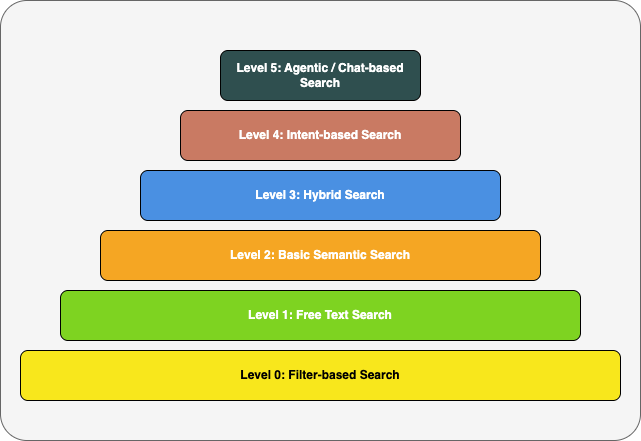
Where Does Your Enterprise Stand?
Search isn’t just a feature — it’s how users think through your platform.
This maturity model isn’t about chasing the next shiny capability — it’s about making sure your search experience is aligned with how your users actually work.
- Are users forced to think like the database?
- Can they find what they mean, not just what they type?
- Do your power users have the tools to explore, refine, and discover?
BTW, not every application needs to reach Level 5. Agentic, chat-based search is overkill for most day-to-day use cases — but it can be transformative for power users in domains where search is the workflow (e.g., editorial teams, analysts, legal ops).
The goal isn’t to hit the highest level — it’s to hit the right one for your users!